
Strip
Manual · version 0.2.0
A channel strip for every track. INPUT, then ten modules in an order you choose, then LIMIT. Pick what the track is with SOURCE and it starts with a sensible chain for it. The modules use the same processing as the single plugins, so COMPRESS sounds like Vocal Chain's compressor, TRANSIENTS like Punch, SATURATE like Colour, DUCK like Pump and LIMIT like Loud. The Strips in a session also find each other without any routing. A track can then dip under a more important one, and the bass can duck under the kick without a side chain.
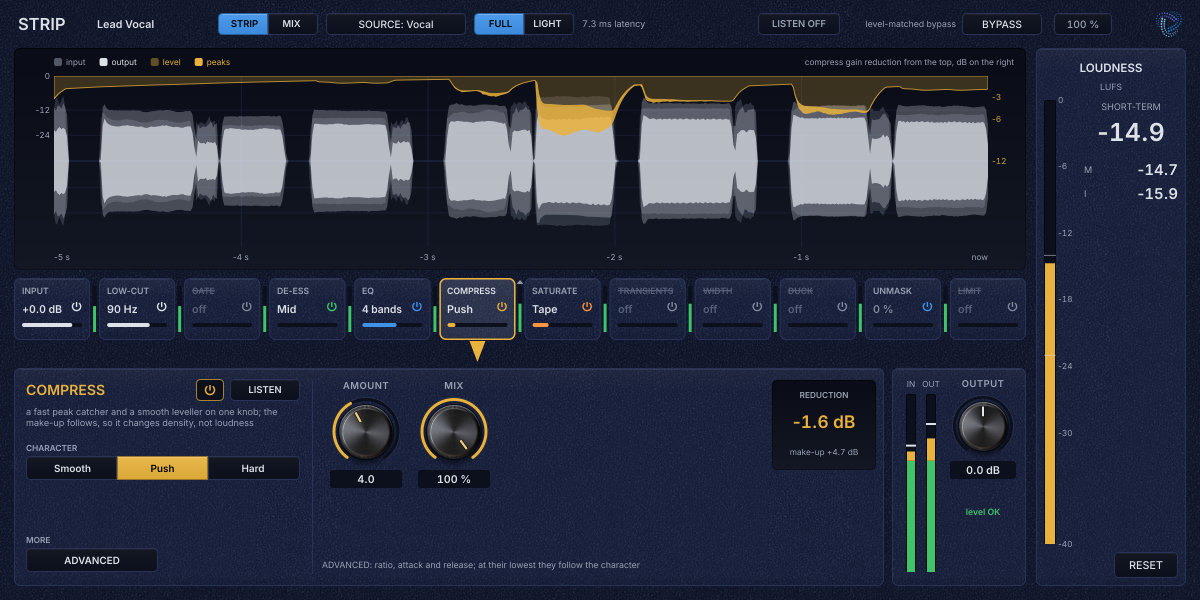
Where it goes
On any track or bus. A new instance starts as Other, with a 30 Hz low-cut, a flat EQ and a gentle compressor. Set INPUT so the track peaks around -6 dBFS, until the hint under INPUT says "level OK". COMPRESS's AMOUNT and the GATE's threshold work on absolute levels and assume that.
The window
The header holds the track's name (Logic's track name, or double-click to type your own), STRIP and MIX, SOURCE, FULL and LIGHT with the current latency, LISTEN, BYPASS and the window size.
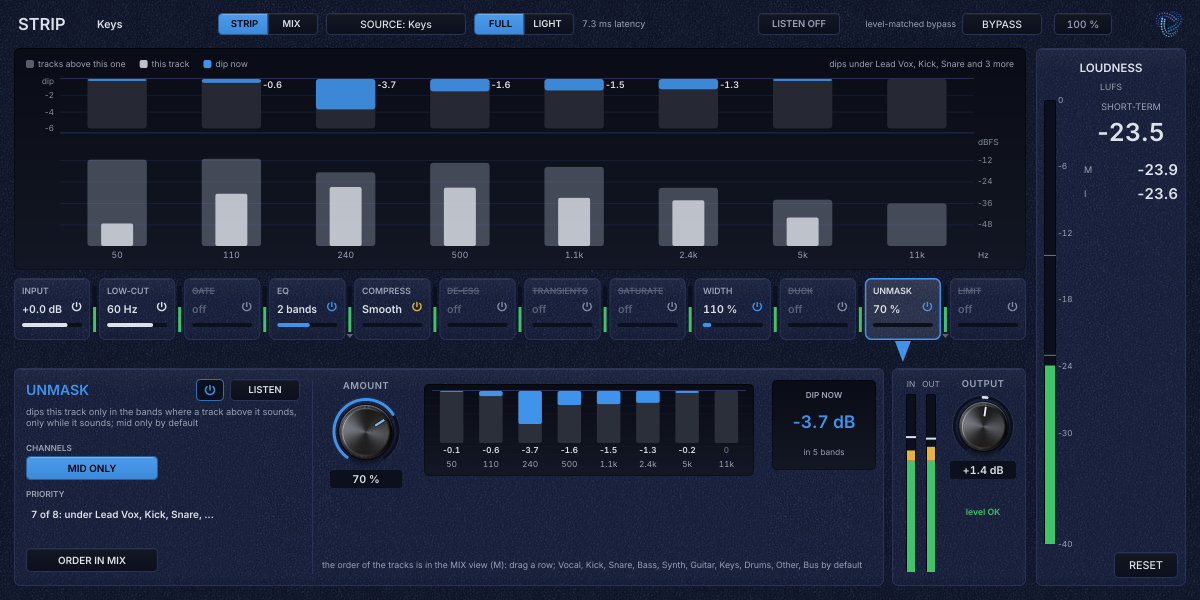
The display shows the open module. INPUT, GATE, COMPRESS, DE-ESS, TRANSIENTS and LIMIT show the last 5 s of the signal, input faint and output bright, with that module's gain change from the top. EQ and LOW-CUT show the live spectrum before and after the module, with its response and a node per band that you can drag for frequency and gain, turn with the wheel for width and double-click to flatten. WIDTH shows a vectorscope with the correlation, SATURATE the curve and how far the signal reaches into it, DUCK the dip over one cycle with the play position, and UNMASK the tracks above, this track and the dip per band.
Under the display is the chain row, one block per module with its name, a word, a live bar and a power symbol. Between the blocks a small meter shows the level at that point, with a triangle when the module before has raised or lowered the level by 0.5 dB or more. Click a block to open it and drag it to move it. The module panel below holds its controls, ADVANCED where there are more, LISTEN, the power switch and a NOW card with one live value. On the right are the IN and OUT meters, OUTPUT and the loudness panel.
Modules
INPUT is always first and LIMIT always last, because a trim belongs before everything and a ceiling only holds at the end. The ten modules between them move freely. Every module has its own power switch with a 20 ms fade, and keeps its settings when it is off.
| Control | What it does |
|---|---|
| INPUT | TRIM ±24 dB, POLARITY flip and MONO, each faded over 20 ms. |
| LOW-CUT | FREQ 20 to 500 Hz, SLOPE 12, 24 or 48 dB per octave. EQ's matched low cut. |
| GATE | THRESHOLD, RANGE, HOLD and RELEASE. ADVANCED adds HYSTERESIS, ATTACK and a key filter (KEY HP, KEY LP), so a kick gate can listen below 300 Hz and ignore the snare and hats. The key can come from the side chain. Hold and hysteresis keep it from chattering in a room tail. |
| EQ | Six bands of bell, low or high shelf, or low or high cut, each on STEREO, L, R, MID or SIDE, with FREQ, GAIN, WIDTH and SLOPE for the cuts. Each band can be DYNAMIC with THRESHOLD and RANGE (ADVANCED adds ATTACK and RELEASE) and can be keyed from the side chain. The same filters as EQ. |
| COMPRESS | AMOUNT 0 to 10, Smooth, Push or Hard, and MIX. ADVANCED adds RATIO, ATTACK and RELEASE, which at their lowest setting follow the character. Vocal Chain's compressor, with its own tuning per SOURCE family. Drums keep their crest, a bass is not distorted by its own gain riding the waveform, and a bus gets 1 to 2 dB of glue. |
| DE-ESS | AMOUNT, FREQ (Auto at its lowest setting) and Soft, Mid or Hard. Vocal Chain's de-esser. |
| TRANSIENTS | ATTACK and SUSTAIN ±100 %, FOCUS Full, Low or High, and SPEED. Punch's transient designer. |
| SATURATE | Tape, Tube, Transformer or Crunch, DRIVE, MIX and AUTO-GAIN. Colour's saturation. |
| WIDTH | WIDTH 0 to 200 %, BASS MONO Off, 80, 120 or 160 Hz, MID and SIDE levels, and GUARD with GUARD AT. The guard pulls the side back when the correlation falls below its setting, so the track stays mono-safe. A mono signal stays mono at any width. |
| DUCK | TRIGGER Tempo, Side chain or Kick track, RATE, DEPTH, LENGTH, CURVE, FOCUS Full or Low only, and THRESHOLD for side chain and kick. With Kick track, FROM picks any Kick track or one in particular, and LOOKAHEAD sets Off, 256, 512 or 1024 samples. Pump's ducking envelope. See the session below. |
| UNMASK | AMOUNT 0 to 100 % (6 dB at most) and MID ONLY. Dips this track only where a more important track sounds. Starts just before LIMIT, on, at AMOUNT 0. See the session below. |
| LIMIT | GAIN 0 to 12 dB, CEILING -3 to 0 dBTP, CLIP 0 to 6 dB and OVERSAMPLING 2x, 4x or 8x. Loud's clipper and true-peak limiter. |
| OUTPUT | ±24 dB, the track's output trim. This is the fader that the MIX view and BALANCE move. |
| LISTEN | Plays what one module changes, its output minus its own input, lined up with the end of the chain. It shows red while one module is heard alone. Click it for a menu. A module that is off plays silence. |
| BYPASS | Level-matched and latency-aligned. |
Starting chains
SOURCE sets which modules are on, their order and their main values. It happens only when you pick one. Opening a session never changes your settings. INPUT, OUTPUT, the mode, BYPASS, LISTEN, UNMASK and the track's place in the MIX view stay as they are. Every starting chain stays within 1 LU of bypass and none of them clips.
| Source | Starting chain |
|---|---|
| Other | Low-cut 30 Hz, EQ flat, compressor Smooth 2. Light and safe on anything. |
| Vocal | Low-cut 90 Hz, de-ess Mid 3, EQ (-2 dB at 300 Hz, +2 dB at 3.2 kHz, +2 dB shelf at 10 kHz), compressor Push 4, Tape 1.5. Vocal Chain's order, with the esses out before the EQ and the compressor lift them. |
| Drums | Low-cut 30 Hz, EQ (+1 dB at 80 Hz, -1.5 dB at 400 Hz, +1.5 dB at 10 kHz), compressor Push 4.5, Tape 2, then transients +15 % attack. Glue for a drum bus or loop with the attack put back on top. |
| Kick | Low-cut 25 Hz, gate keyed below 300 Hz, EQ (+1.5 dB at 60 Hz, -3 dB at 350 Hz, +1.5 dB at 4 kHz), transients +15 % attack and -15 % sustain, compressor Push 3.5, Tube 2. The gate takes the bleed between hits, and the tube harmonics help the kick read on small speakers. |
| Snare | Low-cut 80 Hz, EQ (+1.5 dB at 200 Hz, -2.5 dB at 900 Hz, +1.5 dB at 5 kHz), transients +15 % and -15 %, compressor Push 4.5, Tape 1.5. No gate, because bleed and ghost notes are part of a snare. |
| Bass | Low-cut 30 Hz, EQ (-2 dB at 250 Hz, +1.5 dB at 800 Hz), compressor Push 4, Tube 2.5, width with bass mono below 120 Hz. An even level, harmonics for small speakers and a mono low end. |
| Guitar | Low-cut 100 Hz, EQ (-2 dB at 300 Hz, +1.5 dB at 3 kHz), compressor Smooth 3. Room for the vocal and the bass. |
| Keys | Low-cut 60 Hz, EQ (-1.5 dB at 250 Hz, +1 dB shelf at 8 kHz), compressor Smooth 2, width 110 % with bass mono and the guard on. |
| Synth | Low-cut 40 Hz, EQ (-1.5 dB at 300 Hz, +1 dB shelf at 10 kHz), compressor Smooth 2, width 120 % with bass mono and the guard on. |
| Bus | Low-cut 25 Hz, compressor Smooth 3, Tape 1.5, limiter at -1 dBTP with 1.5 dB of clip. About 1 to 2 dB of glue and a safety limiter. Push GAIN in LIMIT for loudness. |
FULL and LIGHT
FULL is the default and reports one fixed latency whatever is switched on and in whatever order, 331 samples (7.51 ms) at 44.1 kHz, 349 samples (7.27 ms) at 48 kHz and 565 samples (5.89 ms) at 96 kHz. Logic compensates it. Toggling modules, reordering them or picking a SOURCE never changes it.
LIGHT has no latency, for recording and big sessions. INPUT, LOW-CUT, EQ, TRANSIENTS, WIDTH and DUCK are the same. The gate, compressor and de-esser work without lookahead, so the first millisecond of a hit or an ess is caught a moment later. SATURATE runs without oversampling, with a little aliasing at high drive, and LIMIT becomes a soft clipper at the ceiling. A chain keeps working when you switch for a take, and the panel says what changed. Switching the mode fades the output briefly through silence and tells Logic the new latency, and the header shows the new figure for a few seconds.
Switching while playing is safe. A module's power fades over 20 ms. A new order fades the output briefly to the input, switches and fades back.
The session
Every Strip in a Logic session registers itself when it is created and leaves when it is removed. There is nothing to route and nothing to set up.
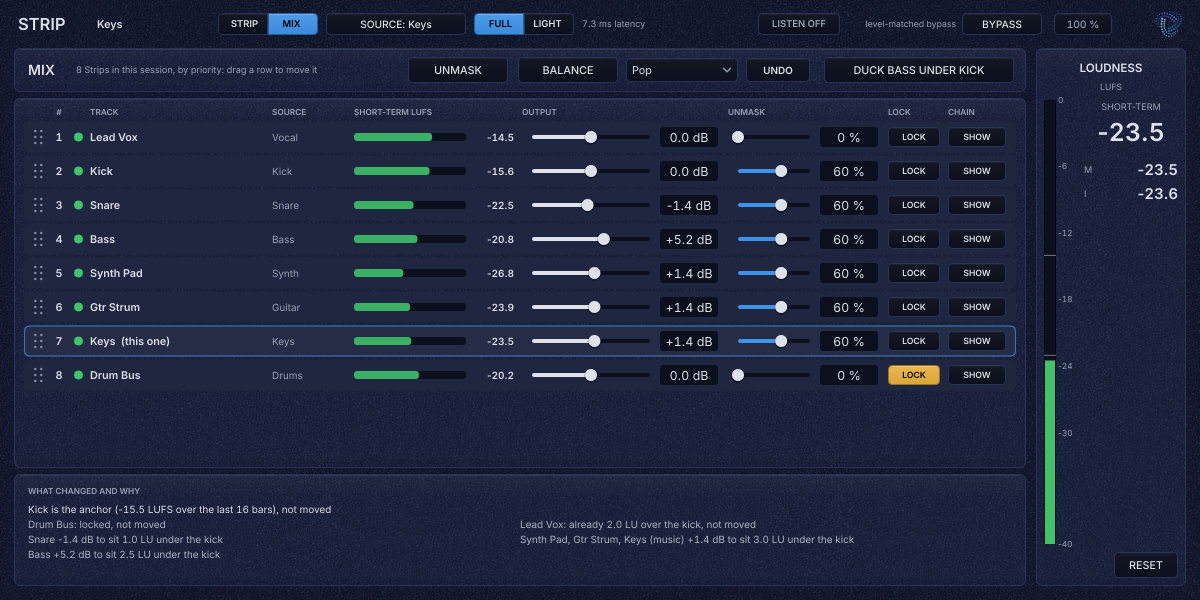
MIX view
The MIX tab in the header, or M while the window has focus, lists every Strip in the session, most important first. Each row shows its place, an activity light, the track's name, SOURCE, the short-term loudness, the OUTPUT fader, the UNMASK amount, LOCK and SHOW. A change you make to another track is carried out by that track's own Strip as a parameter change, so it is saved with the song, can be automated and is undone in Logic like a move on that track. SHOW brings that track's window to the front when it is open. To edit another track's chain, open its Strip in Logic. Drag a row by its handle to change the order. Across the top are UNMASK, BALANCE with its style and UNDO, and DUCK BASS UNDER KICK. Under the rows the view says what was changed and why.
UNMASK
Each track has a place in the order, by SOURCE at first, Vocal, Kick, Snare, Bass, Synth, Guitar, Keys, Drums, Other and Bus. Once you drag rows in the MIX view, the order is yours, and a later SOURCE change keeps it. A track with UNMASK raised dips only in the bands where a track above it sounds and collides with it, and only while that track sounds. The comparison runs in eight bands from 50 Hz to 11 kHz on slow levels, so a held note under a held vocal gets a steady dip without pumping. The dip reaches up to 6 dB at AMOUNT 100 %. Half of it is there about 5 ms after a phrase starts, and it is under 0.5 dB about 130 ms after the phrase ends. With MID ONLY, the default, only the centre is dipped, so a wide guitar keeps its width.
UNMASK in the MIX view sets 60 % on every track that has a track above it. Locked tracks, and tracks with SOURCE Bus or Drums, are left out, because a bus can carry the very tracks above it and dipping it would dip them. Raise those by hand on a bus that carries none of them. The UNMASK panel shows the dip per band and where the track stands, for example "7 of 8: under Lead Vox, Kick, Snare".
The bass under the kick, without a cable
DUCK with TRIGGER Kick track follows the kicks of every Strip with SOURCE Kick, or of the track chosen under FROM. The kick's Strip publishes its hits with their song position, and the bass's DUCK applies them at the same song position, so the dip lands where a side-chained duck would. DUCK BASS UNDER KICK in the MIX view sets it up on every Bass track, with 6 dB below 150 Hz so the bass keeps its harmonics, a 1/8 cycle at 45 % length, and the lookahead that covers the session's buffer.
Logic may process the kick's track and the bass's track in either order. When the bass comes first and the buffer is larger than about 200 samples, a kick can arrive late, by up to the buffer size less those 200 samples. The DUCK panel then says how late, for example "kick: 6.2 ms late", and asks for DUCK LOOKAHEAD. It adds a constant 256, 512 or 1024 samples of latency, only with TRIGGER Kick track and only in FULL, and with 1024 the dip is on time at every buffer from 64 to 1024 samples. LOOKAHEAD is off by default, so the latency never changes unless you ask for it. In LIGHT there is no lookahead. On a stopped transport there is no song position, so each kick is applied as it arrives and the panel says "kick: on arrival".
BALANCE
While the song plays, every Strip keeps the gated loudness of its output over the last 16 bars. BALANCE, with one of Bus Balance's style ladders (Pop, Hip-hop, Rock, Electronic, Acoustic, Country or Ambient), sets static OUTPUT trims so each role sits at the ladder's distance from the kick, and says what it did, for example "Bass +5.2 dB to sit 2.5 LU under the kick".
- Roles come from SOURCE. Drums and Snare count as Drums, Vocal as Vocals, and Guitar, Keys, Synth and Other as Music. Bus is not on the ladder. Several tracks in one role are held as one group and moved by the same amount, so their balance among themselves stays.
- The kick is the anchor and is never moved. Without a kick, the style's absolute role is the anchor.
- All trims are written as one set, and UNDO puts the whole run back exactly. One run moves a track by 12 dB at most. A track that played under a quarter of the window is left alone, and the report says so.
- A LOCKed track is never moved. If a group has a locked member, the others move so the group lands.
- Your own moves are kept. A fader moved since the last run counts as your offset, and a re-run puts the track on the ladder plus that offset. Moves under 0.25 dB are not made.
- BALANCE measures Strip's output before Logic's fader. Leave the faders at 0 dB while balancing, or move them afterwards.
Working with it
- Put Strip on the tracks and set each SOURCE, Vocal on the lead, Kick on the kick, Bass on the bass and so on.
- Set INPUT on each track until it says "level OK". Open a block, adjust by ear, and use LISTEN to hear what a module does.
- Use LIGHT while recording and FULL while mixing.
- Press M in any Strip window and drag the rows into the order of importance.
- Press UNMASK in the MIX view, or raise UNMASK on single tracks, and watch the dips in a track's UNMASK panel.
- Press DUCK BASS UNDER KICK. If the bass's DUCK panel says the kick arrives late, raise DUCK LOOKAHEAD.
- LOCK the tracks you have already set by ear. Play a chorus of 16 bars, then press BALANCE. Press UNDO if you do not like it.
Check in Logic
The session features depend on all Strips running in one Logic process. Logic runs Apple silicon Audio Units in its own process, and then every Strip appears in one MIX view. A Strip opened in Rosetta or out of process would not see the others. If the MIX view says "session features unavailable", the shared memory the Strips use to find each other was refused, and each Strip works on its own. When several projects are open in Logic, their Strips see each other. Only the playing project keys UNMASK and the kick, and BALANCE leaves out tracks that have not played, but the MIX view lists them all, so close other projects for a clean list. A duplicated track gets its own identity and its own row.
Under the hood
COMPRESS starts from Vocal Chain's compressor, a peak catcher with 0.5 ms lookahead and a leveller with automatic make-up. Its detector, attack and thresholds are tuned per SOURCE family, for drums, bass, bus and instruments. A SOURCE from another family warms up the new tuning unheard for 400 ms and then crossfades over 20 ms, so the level does not jump. In FULL, COMPRESS and SATURATE next to each other share one oversampled section. A module that is off is replaced by a matched delay, which is why the latency never moves.
UNMASK compares this track's level per band, as it will reach the mix, with the combined level of every track above it, read 3 ms ahead so the dip starts with a consonant. Its key is the tracks above as they arrive at their Strips, before Logic's faders, so a track pulled far down on its fader still counts as loud. DUCK's kick is the Kick track's input, so bleed on a live kick microphone can trigger it. Raise THRESHOLD if it does. Reverb, delay, modulation and multiband dynamics are left out on purpose. Reverb and delay belong on sends, and the EQ's dynamic bands cover the usual case of a harsh band or a boomy note.
Loudness meter, level-matched bypass and mono handling work the same in every plugin. Common to all plugins