
Kick Tune
Manual · version 0.5
Retunes the body of a kick drum and leaves the click alone. Zero latency, phase coherent, mono and stereo.
The idea
A kick is a broadband click followed by a decaying near-sinusoid with a short pitch glide. The tuning you hear is the decay. The plugin captures the tonal component in a band around the fundamental, moves it by the number of hertz that corresponds to the requested cents, and puts it back. Everything outside the band, including the click, passes untouched. With Tune at 0 and Body at 0 the output is bit-identical to the input.
The shift is in hertz, not in ratio. On a kick, whose overtones are weak, that is inaudible. On a snare or a tom with strong overtones it would detune them against each other, so this is a kick tuner, not a drum tuner.
Controls
| Control | What it does |
|---|---|
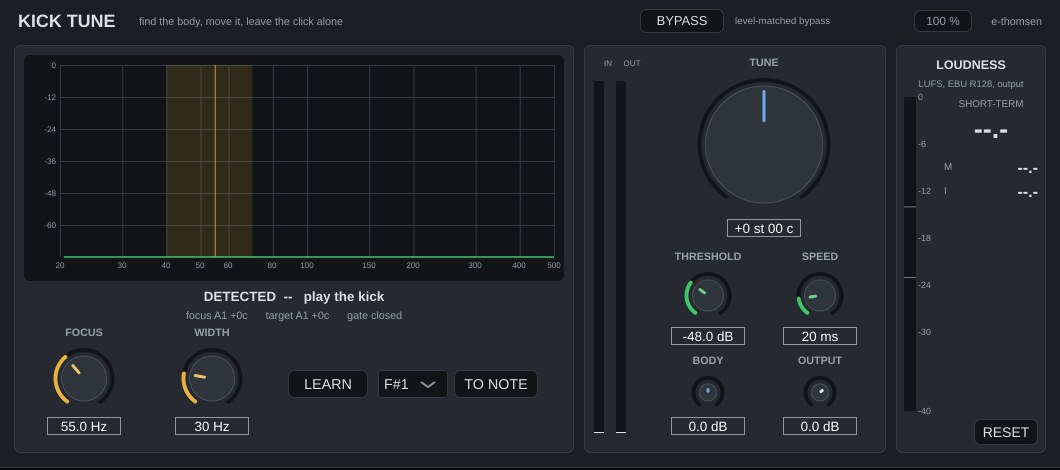
| Focus | 30 to 400 Hz, the centre of the captured band. LEARN sets it to the detected pitch. |
| Width | 10 to 100 Hz, the capture bandwidth. Wider catches more of the glide and the overtones, narrower is cleaner. Start at 30. |
| Tune | ±1200 cents, shown as semitones and cents. The target frequency and note are shown on the display and in the readout. |
| Note selector and TO NOTE | Pick a note from C1 to B3 and press TO NOTE. Focus is set to the detected pitch (or kept if nothing is detected) and Tune to the cents that bring it to the note. Note names are scientific, A1 = 55 Hz. Logic calls the same key A0. |
| Threshold and Speed | The gate. Threshold -70 to 0 dBFS, Speed 5 to 100 ms. Below the threshold the signal passes unprocessed, so bleed on a drum bus is left alone. Speed is the attack, release is four times longer. The readout shows the gate state. |
| Body | ±12 dB, the level of the shifted body against the original. Lower it if a downward shift builds up boom. |
| Output | -24 to +12 dB. |
| BYPASS | Level-matched. |
The display
The spectrum of the input from 20 to 500 Hz, falling slowly. The focus band is shaded amber, the target frequency is a dotted blue line, and a white marker sits at the detected fundamental.
The detector
Each hit above the threshold is captured (up to 500 ms, low-passed at 300 Hz) and its pitch glide is tracked with 64 ms autocorrelation windows every 8 ms. If the glide settles, staying within 3 percent of its final value for at least 40 ms while the body is still within 22 dB of its peak, the settled median is the reading. The readout shows the glide, for example "glide from 92 Hz, settles at 170 ms". The value shown is the median over the last five hits.
If the drum is gone before the glide settles, the readout says SHORT KICK and shows the level-weighted pitch of the glide instead. For those drums the spectrum display and your ear decide. Before any hit has registered, the strongest spectral peak is shown, labelled PEAK, and LEARN uses that. Hi-hat bleed between hits registers as an onset but gives no reading, so it does not disturb the median.
Working with it
- Play a few kick hits and read DETECTED, the drum's current tuning. If it stays on PEAK, lower Threshold until hits register.
- Press LEARN, or set Focus by hand on the peak in the display.
- Turn Tune, or pick a note and press TO NOTE. The dotted line shows where the body is going.
- If the result sounds hollow, widen Width. If it sounds processed, narrow it.
- Set Threshold so the gate reads open on hits and closed between them.
Under the hood
The band is captured by demodulating the input to baseband with a complex oscillator at the focus frequency, low-passing at half the width, and remodulating twice, once at the original frequency to get the captured component as it was and once at the shifted frequency. The output is input minus captured plus body times shifted, blended by the gate. No grains, no FFT and no time stretching, so transients and duration are untouched.
Loudness meter, level-matched bypass and mono handling work the same in every plugin. Common to all plugins