
Reference
Manual · version 0.1
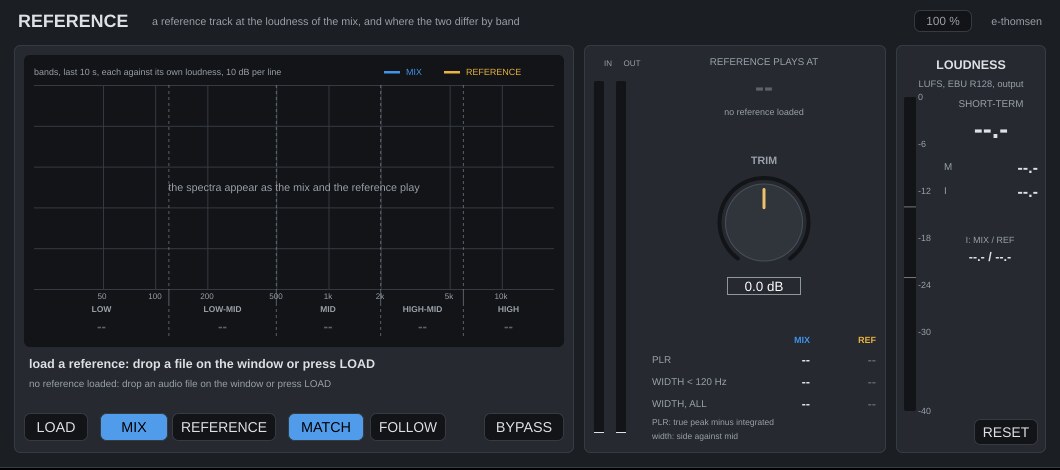
For checking the mix against a record. Load a reference track and switch between mix and reference with one button. The reference plays at the mix's loudness, and the window states in one line where the mix differs.
Where it goes
Last on the mix bus. Mix and reference are both analysed continuously, whichever one you hear.
Controls
| Control | What it does |
|---|---|
| LOAD | Or drop an audio file on the window. WAV, AIFF, FLAC and Ogg, and on the Mac also MP3, M4A/AAC and anything else Core Audio reads. The file is read into memory and resampled to the session rate in the background. Only the first 10 minutes are used. The path is saved with the session and reloaded when it opens; a moved file shows as "file not found". |
| MIX / REFERENCE | What you hear, default Mix, with a 25 ms crossfade. With no reference loaded you hear the mix either way. |
| MATCH | On by default. The reference plays at the mix's integrated loudness (short-term during the first seconds), within ±20 dB. The large amber number shows what the reference is played at. Off, it plays at its own level. |
| TRIM | -20 to +20 dB, default 0. An offset on top of the match. |
| FOLLOW | Off by default. On, the reference plays from the song position and starts and stops with the mix. Off, it loops on its own from where it was, also while the transport is stopped. |
| BYPASS | The mix passes, the reference is silent, and the analysis keeps running. |
The display
| Control | What it does |
|---|---|
| Spectra | Mix in blue, reference in amber, 30 bands from 25 Hz to 16 kHz, averaged over the last 10 seconds. Each curve is measured against its own loudness, so loudness drops out of the comparison. A mix with a lot more low end therefore reads a little lower everywhere else. The curves are drawn tilted 3 dB per octave so pink noise lies flat; the numbers are not tilted. |
| Five regions | LOW (below 120 Hz), LOW-MID (120 to 500 Hz), MID (500 Hz to 2 kHz), HIGH-MID (2 to 6 kHz), HIGH (above 6 kHz). Each number is the mix minus the reference. Blue when the mix has more, amber when the reference has more, white within 1 dB. The verdict line names the two biggest differences of 1 dB or more. |
| PLR | For both, true peak minus integrated loudness. A commercial master at -8 to -6 LUFS sits around 6 to 8 dB. A lower PLR than the reference means a more squashed mix. The reference's PLR is measured over the whole file, the mix's over what has played since the last RESET. |
| WIDTH | For both, below 120 Hz and full band, side against mid in dB over the last 10 seconds. "mono" is no side at all; 0 dB is as much side as mid. |
| Loudness panel | What you hear, plus the integrated loudness of the mix and the reference file as a pair. RESET also restarts the mix's PLR. |
Working with it
- Load a record in the genre, ideally one you would like the master to stand next to.
- Press RESET at the top of the song. Play the chorus of the mix for a while with FOLLOW off, then switch to REFERENCE and back.
- Read the verdict and the five numbers, chorus against chorus.
- Change one thing in the mix and give it ten seconds. The averages are long on purpose.
- A difference below 1 dB is not worth chasing; 3 dB in one region is.
Under the hood
Each signal is summed to mono and analysed with a 4096-point FFT. The band powers of the last 10 seconds are averaged and expressed against the signal's own K-weighted level. Silent passages are skipped, so the curves hold when the music stops. The reference is read, resampled and measured on a background thread before it is swapped in, so the audio never waits. The match gain is smoothed over 50 ms.
Limits: below 60 Hz a band is narrower than one FFT bin at 44.1 or 48 kHz, so the lowest bands lean on their neighbours. A region number averages its bands, so a shelf whose slope sits inside a region reads less than its full gain. The loop point of the reference is not crossfaded. The loudness panel measures what you hear, so switching during a measurement mixes the two in its integrated value; the pair underneath stays clean. In a mono session the reference is summed to mono.
Loudness meter, level-matched bypass and mono handling work the same in every plugin. Common to all plugins