
Drum Widener
Manual · version 0.1.1
Width for a drum bus, made from the drums' own sound. The plugin takes the centre of the drums, holds the attack of every hit out of it, delays it a few milliseconds and adds it to one side while subtracting it from the other. The hits stay in the middle, the decay and the room spread out, and in mono the added part cancels completely. Zero latency.
Where it goes
On the drum bus, after the drum-bus compression, because a compressor after it would react to the added width and pump it. Mono in and stereo out works, so a mono drum recording on a stereo bus can be widened. A stereo bus keeps its own width and gets more on top. A mono listener always hears exactly the centre of the input.
Controls
| Control | What it does |
|---|---|
| PUNCH STAYS CENTRE | 0 to 100 %, default 80. How much of each hit's attack is kept out of the added width. At 80 % the first 10 ms of a kick or snare sit about 37 dB lower in the side than without it, while the body after it is almost untouched. At 0 the side is a plain delayed copy of the centre, hits and all, which smears the attack across the stereo field. |
| TIME | 1 to 30 ms, default 12. How late the side is. 1 to 5 ms colours the tone, 10 to 15 ms reads as space, and above 20 ms the side starts to be heard as its own slap on sparse material. TIME is in milliseconds and does not follow the tempo, because a Haas delay works on the few milliseconds between the ears. |
| LOW CUT | Off, 100, 150, 200 or 300 Hz, default 150. The side has nothing below this, so kick, toms and bass stay mono. 24 dB per octave. |
| HIGH CUT | Off, 8, 12 or 16 kHz, default 12 kHz. Keeps hat and cymbal fizz out of the sides. 12 dB per octave. |
| SATURATE | 0 to 10, default 3. Colour's tape curve on the side only, so the side differs a little from the centre. Auto-gained, so the side's level stays and only its character changes. 3 is a trace, 10 a clearly driven side. |
| WIDTH | 0 to 100 %, default 50. The level of the added side. At 50 % it sits 9 dB under the centre it came from, at 100 % 3 dB under, which is as far as it goes, so the channels never get full comb notches. At 0 the output is the input, sample for sample. |
| FLIP | Mirror image. The right channel gets the side in phase instead of the left. Use it when one side feels heavier. |
| DRIFT | Off by default. The delay wanders very slowly by up to 0.2 ms, so the comb filtering in each channel never sits still. The pitch change is 0.2 cent at most. Try it when a long, ringing sound such as a crash or a tom gets a static, phasey colour. |
| MONO | In the header. Listen in mono to check. The added width cancels and what is left is the centre of the input. |
| DELTA | In the header. Plays only the added side, as plus on the left and minus on the right. The meters and the loudness panel keep reading the real output. |
| BYPASS | Level-matched, with the match shown in the status line. It overrides DELTA. MONO applies to whatever is heard, bypassed or not. |
Every switch and selector crossfades over 20 ms. Knobs glide, TIME over 50 ms, which bends the pitch of the side briefly while you turn it, as any delay does.
The display
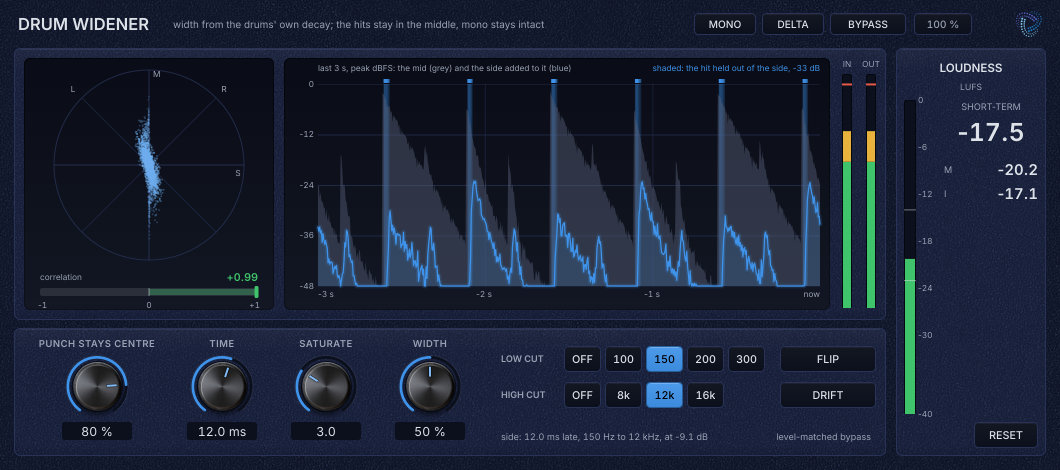
On the left, a vectorscope of the last 100 ms of the output, with mono vertical, left and right on the diagonals and out of phase horizontal, and the correlation over the last 300 ms under it. In the middle, the last 3 seconds as peak levels, the centre of the input in grey and the added side in blue. Shaded strips mark where a hit is held out of the side, with the deepest cut of the moment in the corner. A line under the controls sums up the side, for example "side: 12.0 ms late, 150 Hz to 12 kHz, at -9.1 dB". The vectorscope and correlation show the output as the mix gets it, without MONO and DELTA.
Working with it
- Insert it after the drum-bus compression.
- For a narrow or mono drum recording, start at WIDTH 50 to 70 %. For a bus that is already wide, use 20 to 40 %.
- Press MONO now and then. The drums should keep their level and punch, because nothing the plugin adds survives in mono.
- Use DELTA to hear what is being added. There should be room and decay in it, and little of the crack of the snare.
- If kick or toms feel wider than you want, raise LOW CUT to 200 or 300 Hz. If the hats get a flam, lower HIGH CUT to 8 kHz or raise PUNCH STAYS CENTRE.
- If one side feels heavier, press FLIP.
Under the hood
The centre is (L + R) / 2. The side starts as the centre with the attack of each hit removed by two of Punch's level-independent attack detectors, one listening to the whole centre and one to the part above 2 kHz. The second catches hats that sit in the decay of a kick, so they stay in the middle without the room in the low mids being chopped at every eighth. The side is then delayed by TIME, band-limited by LOW CUT and HIGH CUT, saturated at twice the sample rate, auto-gained, scaled by WIDTH and added to the left channel while it is subtracted from the right. The centre of the output is therefore exactly the centre of the input. The oversampling and the detector's 1 ms look-ahead are taken out of the side's own delay, so the dry signal is never delayed and the plugin reports no latency.
Limits. Each channel is the centre plus or minus a delayed copy of it, so each channel on its own has comb filtering, with the left channel's peaks at the right channel's dips. The sum is flat and mono is untouched. In the side's band the teeth are about +2.6 and -3.7 dB at WIDTH 50 % and +4.6 and -10.5 dB at 100 %, spaced 1 / TIME apart, 83 Hz at 12 ms and 1 kHz at 1 ms. At 1 to 5 ms they are wide enough to hear as tone, hollow or boxy. From about 10 ms they are dense enough to read as space. The hit itself is held out of the side and so is never combed. On headphones, and when soloing one speaker, the colour is more obvious than on a pair of speakers. Hats keep less of their attack out of the side than kick and snare do, and their decay still spreads.
Loudness meter, level-matched bypass and mono handling work the same in every plugin. Common to all plugins