
KickBass Check
Manual · version 0.7
Insert on the bass track, set the side chain to the kick. It shows the notes of both and the interval between them, who owns each low band while the kick sounds, and the kick body against the beat. It can also duck the bass per band under the kick.
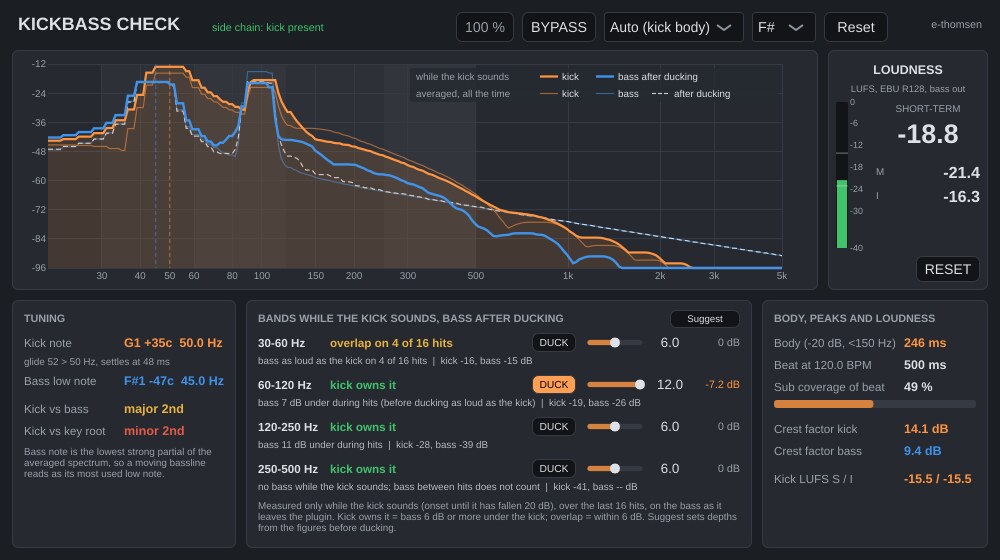
Where it goes
On the bass track, with the kick track chosen in the Side Chain menu at the top of the plugin window. The header line turns green and says "side chain: kick present" when kick signal arrives. With every DUCK button off the audio passes through bit-identical and the plugin only measures. Analysis and ducking run with the window closed.
What it shows
| Control | What it does |
|---|---|
| Spectrum | Kick (orange) and bass (blue), 20 Hz to 5 kHz, with the four low bands shaded. The thin curves are long-term averages for tuning, with the bass after ducking dashed when a band ducks. The thick curves are measured only while the kick sounds: the kick (filled) and the bass after ducking. The band verdicts are based on those. |
| Kick note | The pitch the kick settles to, from a glide tracker on each hit (the same detector as Kick Tune), median over the last eight hits. The line below shows the glide, for example "glide 67 > 38 Hz, settles at 176 ms", or says that the drum has no settled pitch and reports the level-weighted value instead. Before any hit, the strongest low peak of the averaged spectrum is shown, marked (spectral). |
| Bass low note | The lowest strong partial of the averaged bass spectrum, so a moving bass line reads as its most used low note. |
| Kick vs bass, kick vs key root | The interval, coloured: unison, fourth and fifth green; minor second, tritone and major seventh red; the rest amber. Set the key root in the header. |
| Bands | 30 to 60, 60 to 120, 120 to 250 and 250 to 500 Hz, measured while the kick sounds. Each row gives the verdict in words (kick owns it, overlap, bass owns it), on how many of the last 16 hits, and the kick and bass levels during the hits. With DUCK on, the figure before ducking is shown alongside. |
| Body, peaks and loudness | Kick body length (time above -20 dB of the hit peak, below 150 Hz) against the beat at the song tempo, as a percentage. Crest factors of kick and bass. Kick loudness, short-term and integrated. |
What overlap means
Overlap only counts while the kick sounds. Each kick hit opens a window at its onset and closes it when the kick (below 150 Hz) has fallen 20 dB, the same point that gives the body length. Bass between hits does not count, however loud, so a bass that plays in the gaps reads clear in every band.
Inside each window the kick and the bass are split into the four bands and their levels taken. The bass is measured after the ducker. Per band, over the last 16 hits:
- The bass counts as present on a hit when it is within 20 dB of the kick in that band (before ducking) and above -70 dBFS.
- Kick owns it: the bass is 6 dB or more under the kick. Overlap: within 6 dB. Bass owns it: more than 6 dB over the kick.
- A hit overlaps when the bass after ducking is less than 6 dB under the kick on that hit.
A row reads, for example, "kick owns it, bass 7 dB under during hits (before ducking as loud as the kick)", or "overlap on 4 of 16 hits". A bass note that only sometimes falls on a kick reads as that count.
With DUCK on, the after-ducking figure drops by what the ducker actually takes off during the hit. That is less than the depth, because in the two lowest bands the ducker reaches full depth only 20 to 30 ms into the hit. With 12 dB set, a bass held through a 200 ms kick reads about 8 dB lower during the hit.
Ducking the bass under the kick
Each band row has a DUCK button, a depth (0 to 12 dB) and a live readout of the cut. With DUCK on, the bass is cut in that band by up to the depth while the kick has energy in the same band, and recovers afterwards. Attack is 2 ms. The key is the kick's own level in that band, normalised to its recent peak, so the cut reaches the depth on every hit regardless of level and leaves bleed alone.
Suggest fills the four rows from the overlap measured while the kick sounds, before ducking: off where the bass never sounds during the kick or owns the band, 6 dB where they overlap, 9 dB where the kick owns it and the bass is still there. Pressing it again with ducking on gives the same answer. Edit from there.
The release menu in the header is Auto by default. It follows the measured kick body (60 % of the -20 dB body length, 40 to 600 ms), so a tight kick frees the bass quickly and a long one holds it down. Fixed values of 60, 120, 250 and 500 ms are available. BYPASS switches the ducking off. Analysis and loudness keep running while bypassed.
Working with it
- Play a section where kick and bass both play until the bands show a count of hits.
- Read the kick note, the bass note and the interval. A red interval is a tuning question. Kick Tune can move the kick.
- Read the band rows. Overlap on most hits in 30 to 60 or 60 to 120 Hz is where the two fight.
- Press Suggest and play again. Watch the after-ducking figures and the thick blue curve drop, and edit the depths by ear.
- Compare with BYPASS.
Under the hood
The band split is four Linkwitz-Riley 8th-order crossovers (48 dB per octave) at 60, 120, 250 and 500 Hz, with the lower bands carried through the allpass of each later crossover so the bands sum back to the input exactly in magnitude. A one-octave band holds only about 80 percent of a tone at its edge, so a bass note at 90 Hz under a 9 dB cut on 60 to 120 drops about 7 dB, while a note mid-band gets the full depth. Above 500 Hz nothing is touched. Zero latency.
The overlap measurement uses the ducker's own crossovers. Each band's window is shifted by that band's filter delay (19 ms in the two lowest bands, 11 ms in 120 to 250, 6 ms in 250 to 500), so the measurement adds no lag of its own. The analysis runs on the plugin's own timer, so it keeps running with the window closed and the Auto release follows the kick on the playing track.
Loudness meter, level-matched bypass and mono handling work the same in every plugin. Common to all plugins